Pre-Programmed Lighting Effects for Holiday Displays
Pre-programmed lighting effects are automated, time-based sequences that change lighting parameters like color, brightness, and motion in a set pattern stored in fixture firmware or controlled by lighting software. The industry term for these is “preset effects” or “programmed sequences,” and they form the backbone of every animated holiday display you see on a neighbor’s roofline. Understanding what are pre-programmed lighting effects gives you a real advantage: you can choose the right fixtures, activate the right modes, and build a display that looks polished every single time. EZRGB designs its entire platform around making these effects accessible to homeowners with no technical background.
What are pre-programmed lighting effects, exactly?
Pre-programmed lighting effects are time-based, repeating changes in parameters like color, brightness, and position, stored in fixture firmware or generated by a lighting controller. The term comes directly from DMX and stage lighting, where “effects” describe any automated parameter change that runs on a loop or evolves over time. For homeowners, this means your lights can shift from red to green, pulse in waves, or sparkle on their own without you touching a single button after setup.
The key distinction is between firmware-based effects and controller-driven sequences. Firmware effects live inside the light fixture itself. Controller-driven sequences run from an external device, like an app or a show player. Both deliver the same result: a repeatable, automated visual pattern that runs exactly the same way every time you power on your display.

Addressable pixel lighting takes this further. Pixel lighting creates effects by stepping colors and intensity across individual segments over time, which enables detailed animations like color waves rolling down a roofline or a snowfall pattern cascading across your facade. Simple on/off string lights cannot replicate this level of detail.
How do pre-programmed lighting effects work technically?
The technical structure behind preset effects relies on two core concepts: scenes and chases.
A scene is a frozen snapshot of all fixture values at one moment. Think of it as a single photograph of your lights: every bulb at a specific color and brightness level. A chase plays multiple scenes in sequence, creating the impression of motion or rhythm. When your lights appear to “run” down the roofline, that is a chase cycling through dozens of scenes per second known as frames per second or FPS.
Here is how the process works from fixture to display:
-
Store the scenes. The player saves individual lighting states, each defining color, brightness, and position values for every light segment.
-
Build the chase. The controller strings scenes together with defined timing, such as 50 milliseconds per step, to create smooth motion or sharp transitions.
-
Loop the sequence. The effect repeats continuously until you stop it if scheduled that way.
-
Sync across zones. In multi-zone displays, the player sends the same timing signal to all fixtures so every section of your display moves together.
DDP protocol is the new industry standard that makes this synchronization possible in professional and prosumer setups. It sends precise fixture values 40+ times per second, which is fast enough to create fluid motion. Consumer smart LED products replicate this logic through Wi-Fi apps and onboard chips, without requiring you to understand DDP at all.
Pro Tip: If your lights have an “auto” mode and a “program” mode, always choose “program” for holiday displays. Auto modes often randomize effects unpredictably, while program modes run your chosen sequence exactly as designed.
The role of addressable pixels is worth understanding here. Each pixel in an addressable string is an independent LED segment with its own color and brightness value. More addressable segments produce richer gradients and more detailed motion effects. A 50-pixel roofline strip can display a smooth rainbow wave. A 500-pixel facade can show a full animated snowstorm.
What types of pre-programmed lighting effects are common in holiday displays?
Holiday lighting effects map directly onto stage lighting categories. The most common types you will encounter as a homeowner include:
-
Color transitions. Gradual shifts from one color to another, such as red fading into green or blue blending into white. These create a calm, elegant feel.
-
Chases and running lights. A sequence of lit segments that appear to move in one direction. Classic “running” Christmas lights use this effect.
-
Strobe effects. Strobe effects built into LED strings create sharp, rapid flashes without needing a separate controller. They add energy and urgency to a display.
-
Twinkle effects. A gentle, randomized fade in and out across individual pixels. Twinkle mimics the look of stars and works well for subtle, elegant displays.
-
Gradient waves. A color or brightness pattern that rolls across the light string like a wave. This is only possible with addressable pixel lighting.
-
Static scenes. A single color or pattern held without animation. Useful as a base layer when combined with animated overlays.
Consumer smart LED products now include a large number of these modes out of the box. Products like the Dreame Strip Lights P11 offer 70+ preset dynamic scene modes accessible through a smartphone app. That scale of options means most homeowners never need to program a single custom effect. This will give you a basic control to your light show.
The practical difference between strobe and twinkle matters for decoration style. Strobe works well for high-energy, attention-grabbing displays near the street. Twinkle suits indoor trees, window frames, and areas where you want warmth rather than drama. Mixing both in a single display, with strobe on the roofline and twinkle on the shrubs, creates visual depth.
Scenes form the base looks and chases bring them to life. When you tap a preset in a smart lighting app, you are selecting either a static scene or an animated chase built from multiple scenes. Understanding this distinction helps you choose the right mode for each zone of your display.
Why Choose EZRGB Sequences Over Manual or Sound-Active Modes?
Professionally programmed EZRGB sequences deliver reliable, repeatable results every time you start your show. That’s one of the biggest advantages over manual color changes or sound-active lighting modes.
Sound-active modes react to whatever they hear, meaning the effects can change based on background noise. A passing car, barking dog, or gust of wind can trigger unexpected lighting patterns. EZRGB sequences are programmed in advance and synchronized to music, so every effect plays exactly as designed from beginning to end.
The benefits are easy to see:
-
Consistent playback. Your show performs the same way every night, so family, friends, and visitors enjoy the experience exactly as you intended.
-
No programming required. EZRGB sequences are professionally created and ready to play. Simply download your show, sync it with EZPlayer, and enjoy.
-
Professional-quality effects. Instead of basic built-in patterns, EZRGB sequences combine fades, twinkles, chases, morphs, color transitions, and musical timing to create a polished animated light show.
-
Perfect synchronization. Every roofline, tree, wreath, arch, and decoration is timed together through EZPlayer, creating one seamless performance instead of independent lighting zones.
-
Easy updates. Purchase a new sequence, and EZPlayer automatically syncs the latest files from your EZRGB account, making it simple to refresh your display each season.
EZRGB Tip: Layer multiple effects within a sequence to create depth and movement. For example, a roofline can slowly transition between cool white and festive colors while subtle twinkle effects sparkle throughout the display. Because every pixel is individually controlled, EZRGB sequences create visual interest that simply isn’t possible with basic controller presets or sound-active modes.
The result is a display that feels professionally choreographed rather than randomly animated. Instead of lights simply reacting to sound, every effect is intentionally designed to complement the music and guide your audience’s attention from one part of your display to the next.
How to Use Pre-Programmed Lighting Effects in Your Holiday Display
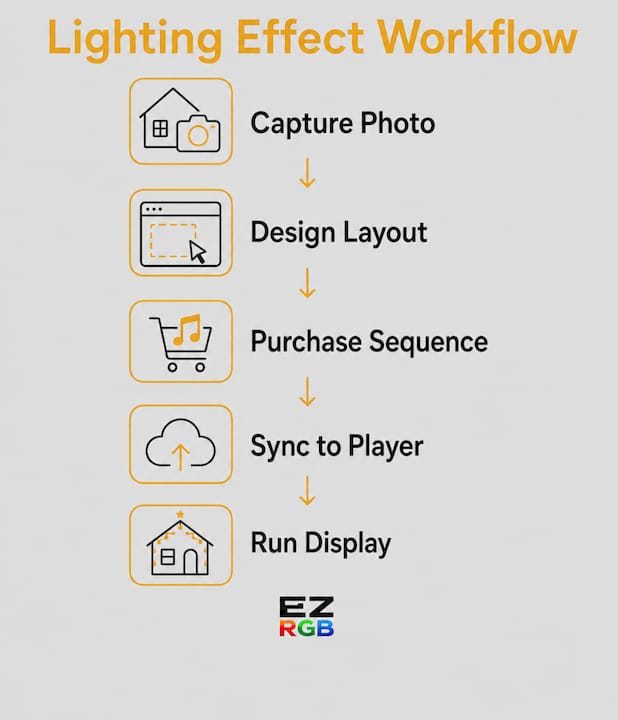
Setting up pre-programmed Christmas light effects doesn’t require technical expertise. With EZRGB, professionally programmed Christmas light sequences and EZPlayer make it easy to build a visually engaging animated holiday light display.
Follow these steps to get the best results:
-
Choose compatible RGB lighting. Whether you’re using smart C9 bulbs, pixel nodes, or other RGB decorations, EZRGB lights and decorations are compatible with the platform. EZRGB sequences are designed to work with pixel-based displays, giving you access to professionally choreographed animations instead of basic controller presets.
-
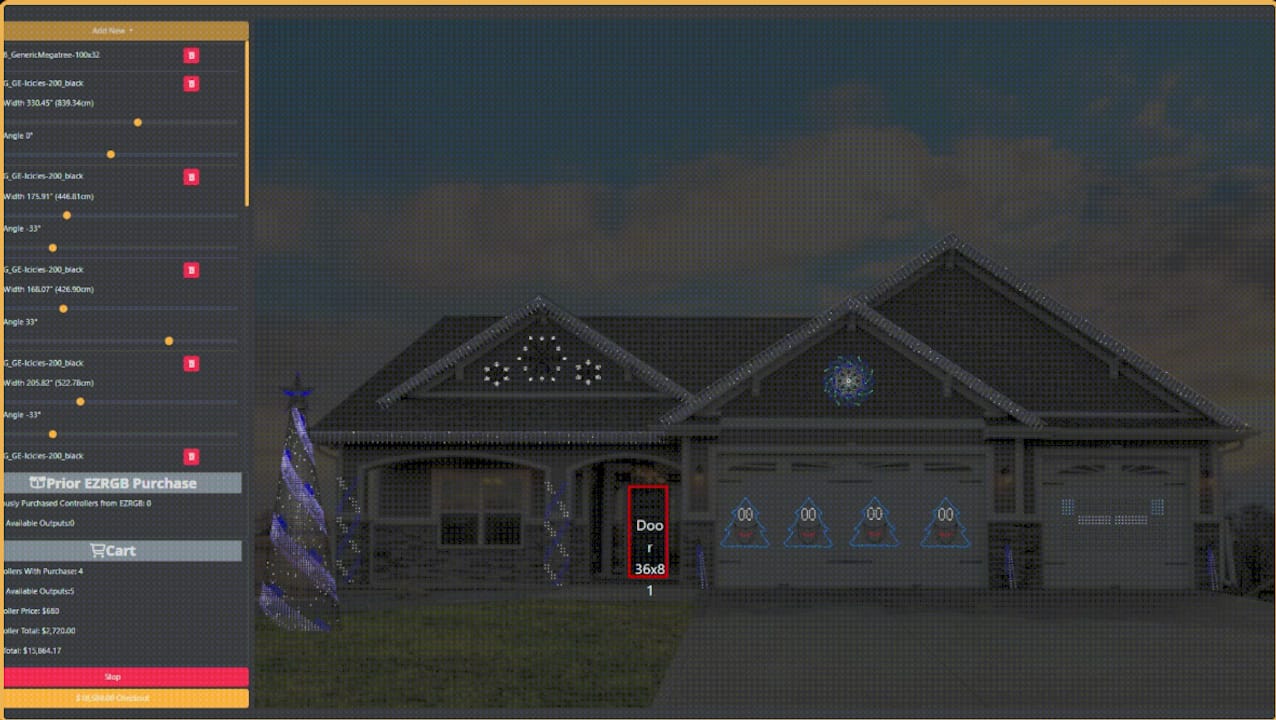
Map your display zones before you install anything. Divide your home into logical sections such as the roofline, windows, shrubs, trees, and pathways. Assign a different effect style to each zone. The EZRGB Designer lets you visualize these areas on a photo of your home before installation, helping you create a balanced Christmas light display.
-
Preview your effects before installation. One advantage of EZRGB is that you can preview your animated Christmas light show before purchasing or installing your decorations. This allows you to fine-tune your design and see how each effect contributes to the overall display.
-
Set your playback schedule. Use the scheduler in EZPlayer to automatically start and stop your holiday light show at the same time every evening. Once configured, your display runs consistently without requiring daily setup.
-
Keep every zone synchronized. EZPlayer synchronizes every roofline, tree, wreath, window outline, and yard decoration using professionally programmed Christmas light sequences, ensuring your entire display moves together with perfect timing.
-
Add music synchronization. With EZRGB, music synchronization is built into the sequence itself. Every chase, twinkle, fade, and color transition is intentionally programmed to match the soundtrack, creating a polished music synchronized Christmas light show rather than relying on random sound-reactive effects.
A common pitfall is running too many high-energy effects at once. Fast chases and strobes on every prop can create visual clutter instead of impact. Professionally programmed EZRGB sequences balance energetic moments with slower transitions, allowing your focal points to stand out while creating a display that feels intentional, polished, and enjoyable to watch.
Key Takeaways
Pre-programmed lighting effects are the most reliable way to build a consistent, visually dynamic holiday display without custom programming or technical expertise.
| Point | Details |
|---|---|
| Core definition | Pre-programmed effects are time-based, repeating lighting sequences stored in controller or show player. |
| Scenes vs. chases | Scenes are static snapshots; chases sequence scenes over time to create motion and rhythm. |
| Effect variety | Common types include color transitions, chases, strobes, twinkle, and gradient waves. |
| Advantage over sound-active | Pre-programmed sequences are perfectly timed; sound-active modes vary unpredictably with ambient noise. |
| Layering for impact | EZRGB’s sequences are layered perfectly to make your design eye-catching everytime. |
What I’ve learned from building displays with pre-programmed effects
The biggest mistake I see homeowners make is treating pre-programmed effects as a set-and-forget feature. You pick a mode, power on the lights, and assume the display takes care of itself. That works, but it leaves a lot of visual potential on the table.
The animated Christmas light displays that genuinely stop traffic combine multiple lighting effects across distinct zones. A roofline animation, twinkling window outlines, and color-changing yard decorations create a layered holiday light show that naturally draws the eye from top to bottom. Each zone has its own purpose, but professionally programmed Christmas light sequences keep everything perfectly synchronized, making the display feel intentional rather than random.
Another lesson is that professionally programmed Christmas light effects are far more valuable than dozens of generic controller presets. Rather than cycling through built-in patterns that can feel repetitive, EZRGB sequences are designed to complement the music with coordinated chases, twinkles, fades, morphs, and color transitions. Once you’ve found a sequence and design you love, EZPlayer lets you save your setup and automatically sync your show each season, so your animated holiday lighting performs just as beautifully year after year.
Managing complexity is what separates a frustrating project from an enjoyable one. Start with a simple Christmas light display featuring a roofline and a few pixel decorations. As your confidence grows, expand your holiday lighting by adding new props, sequences, and animations. The EZRGB platform is designed around this approach, allowing homeowners to build a professional-quality animated Christmas light show one step at a time. With the EZRGB Designer, cloud-based sequencing, and EZPlayer handling synchronization and playback, you can create an impressive display without needing to become an expert in Christmas light programming or pixel controllers.
— EZRGB Team
EZRGB makes animated holiday displays approachable
EZRGB takes the technical work out of pre-programmed holiday lighting. You upload a photo of your home, drag and drop pixel lighting props into position, and sync your chosen effects with a music track, all without writing a single line of code.
EZRGB’s pixel lighting displays come with preinstalled effects ready to run from day one. Products like the Roofline Special bring chase and color transition effects directly to your home’s most visible surface. The EZRGB guides library walks you through zone setup, effect selection, and music sync at your own pace. Whether you are setting up your first animated display or refining one you have run for years, EZRGB gives you the tools to make it look exactly the way you want.
FAQ
What are pre-programmed lighting effects in simple terms?
Pre-programmed lighting effects are automated sequences that change a light’s color, brightness, or motion in a set pattern without manual input. They are stored in the fixture itself or run by a controller and repeat consistently every time you power on your display.
What is the difference between a scene and a chase?
A scene is a single saved lighting state, like one color at one brightness level. A chase plays multiple scenes in sequence to create the appearance of motion or rhythm.
Can I use pre-programmed effects without a DMX controller?
Yes. Most consumer smart LED products and pixel lighting kits include built-in firmware effects that run directly from the fixture or a companion app, with no DMX controller required.
Why Do EZRGB Sequences Look Better Than Sound-Active Modes for Holiday Displays?
Professionally programmed EZRGB Christmas light sequences deliver the same stunning performance every time your animated holiday light show runs. Every effect is carefully choreographed to the music, ensuring your Christmas light display remains perfectly synchronized from start to finish. Sound-active modes, on the other hand, react to ambient noise rather than the actual music track. A passing vehicle, barking dog, or nearby conversation can trigger unexpected lighting changes, making your holiday lighting appear random instead of professionally coordinated.
How Many Lighting Effects Should You Use in a Holiday Display?
For most animated Christmas light displays, three complementary effect types are the perfect starting point. Rather than filling every decoration with fast-moving animations, use professionally programmed EZRGB Christmas light sequences to create balance throughout your holiday light show.