EZRGB and the Commercial Designer: Bid Jobs in Minutes
EZRGB Commercial Designer is the right platform for commercial lighting installers who need to design, price, and bid animated RGB light shows fast. Upload a site photo, build your layout in the drag-and-drop designer, let EZSequence auto-generate the sequence, and walk out with a priced proposal in a single session. To get started, request an installer account or watch the
before your next client meeting.
Two things make this platform worth your time. First, the designer plus EZSequence collapses the gap between site visit and deliverable quote. Second, EZPlayer gives your client cloud-based playback and scheduling, which means you can push updates, swap songs, and service the show remotely rather than rolling a truck every time something changes.

Table of Contents
-
How do you design, price, and bid a commercial RGB job using EZRGB?
-
What hardware and integrations do commercial installs require?
-
How do you budget and estimate a commercial RGB lighting job?
-
Why serviceability is the commercial opportunity most installers undervalue
What does the EZRGB Commercial Designer platform include?
The platform is built around three connected tools, each one reducing a different kind of friction in the commercial workflow.
-
Layout Designer: Upload a photo of the venue, then drag and drop props onto the image to build a true-to-site layout. No CAD skills required. The visual output doubles as a client-facing preview.
-
EZSequence: Once your layout is set, your client can purchase songs from EZSequence that auto-generates a synchronized animated sequence. Programming that used to take hours gets handled automatically.
-
EZPlayer: The cloud-based show player handles scheduling, song sync, and remote updates. Clients can see their show calendar; you can push changes without a site visit.
-
Plug-and-play props and preprogrammed controllers: EZRGB’s preinstalled pixel props arrive ready to connect. Controllers upload function in EZPlayer helps cut onsite programming time significantly.
-
Demo and onboarding resources: A full platform walkthrough video and the 2026 How to Use EZRGB Light Show Designer guide walk new installers through every step. The Guides and Help hub covers placement, product care, and repair.
“The visual ‘wow’ factor wins projects, but operational reliability and ease of updates keep clients and generate recurring revenue.” Experienced installers consistently point to serviceability as the engine behind repeat business — and EZPlayer’s remote update capability is exactly that engine.
The programming controllers deserve a specific callout. On a commercial job, every hour of onsite programming is billable time you could be spending on the next install. Controllers that connect and program let your crew focus on physical installation.
How do you design, price, and bid a commercial RGB job using EZRGB?
The workflow below takes you from a client brief to a delivered proposal. Keep it close for every new commercial inquiry.
-
Collect site photo and measurement. Take a straight on picture of the location (house, commercial building, etc.) Measure one structure details for scaling (door, window, garage door). Take note of circuit outlets and panel capacity.
-
Upload the site photo into the Layout Designer. Drop the image into the designer, place the box on the object you measured and enter those measurements. Then place EZRGB props where they will physically install. The layout becomes your visual proposal and your parts list simultaneously.
-
Play the preview. With your layout designed EZSequence auto-generates a short music-synchronized animated sequence based on your prop placement. Review the preview and adjust prop groupings if needed.
-
Add labor. Layer in your crew hours, lift rental if the site requires elevated access, and any electrical work needed to support the load. Budget by décor complexity and access requirements to keep estimates consistent across jobs.
-
Send the proposal. Now all you have to do is click “Send Invoice” and the system includes a screen shot of the design, a short video of the show to music, and a invoice including your logo in the header.
Pre-bid checklist — collect this before you open the designer:
-
One measured object in the picture (Door, window, etc)
-
Number of circuits available, location, and panel amperage
-
Lift or ladder access requirements and any permit needs
-
Takedown and storage responsibilities
How does installer onboarding and commercial pricing work?
Requesting an installer account
EZRGB vets commercial installers before granting account access. When you submit your request through the EZRGB installer onboarding page, expect to provide your business name, service area, and a brief description of your commercial experience. The team reviews applications and follows up directly, so use a business email address and be specific about the types of projects you handle.
What goes into commercial pricing
A commercial bid built on the EZRGB platform typically includes these components:
-
Hardware: Pixel props (roofline strings, C9 pixel strings, specialty props), pixel controller, and waterproof pixel connectors
-
Sequences: Purchased EZRGB animated sequences synced through EZPlayer anytime.
-
Platform access: Installer accounts are free.
-
Labor: Installation crew hours, programming review time, and takedown
-
Access equipment: Lift rental, scaffolding, or elevated-access costs
-
Maintenance and service: Mid-season check visits and emergency response
-
Contingency: Typically 10–15% of the total materials and labor subtotal
Controllers and sequencing together represent a small portion of a typical commercial project budget, which means labor and access logistics drive your cost structure.
Municipal and large-venue clients often require proposals that cover installation, power distribution, synchronization, maintenance, removal, and on-site technical support. City procurement pages show the deliverable format those clients expect, and mirroring that structure in your proposal signals professionalism.
What hardware and integrations do commercial installs require?
Reliable commercial shows depend on hardware choices made before the first prop goes up. Cutting corners on any project creates problems mid-season that are expensive to fix.
Core hardware checklist:
-
Pixel controller (Supplied in quote from designer)
-
Distributed pixel controllers sized to each zone’s prop count (Auto calculated in designer)
-
Waterproof connectors rated for outdoor use (Supplied in quote by designer) May want to by a few extra.
Playback and integration:
-
EZPlayer handles cloud scheduling, song syncing, and remote sequence updates. Clients log in to see their show calendar; you push firmware and sequence changes from your office.
-
xScheduler and FPP: EZRGB sequences can be used with these players.
What are the most common commercial installation pitfalls?
Even experienced installers run into the same problems on commercial jobs. Knowing them in advance is the fastest way to avoid them.
-
Inadequate spare parts. A failed controller mid-season with no spare on-site means a dark display and an unhappy client. Keep a spare pixels, extensions, and even a controller to help you stand out from the rest.
-
Unclear client expectations on downtime. Put response time commitments in the contract before you sign. Clients who expect same-day repairs on a Sunday need to know your service terms upfront.
-
Skipping pre-season testing. Run the full show in EZPlayer before opening night.
Pro Tip: Use EZPlayer’s scheduling feature to run a full dress rehearsal 48 hours before the client’s opening date. That window gives you time to address any issues without pressure.
On-site troubleshooting checklist:
-
Verify all pixel prop connectors are fully seated and weatherproofed
-
Test the full sequence from the EZPlayer scheduler before leaving the site
-
Document any mid-season changes in your service log for end-of-season reporting
Key Takeaways
EZRGB Commercial Designer gives lighting installers a complete path from site photo to priced proposal, with auto-sequencing, cloud playback, and preprogrammed hardware that reduce both programming time and service overhead.
| Point | Details |
|---|---|
| Speed to bid | The layout designer plus EZSequence turns a site photo into a sequenced proposal in minutes. |
| Hardware readiness | Controllers are preprogrammed from the EZPlayer allowing you to save time. |
| Budget structure | Controllers and sequencing are typically less than 30% of project cost; labor and access logistics drive the total. |
| Cloud serviceability | EZPlayer enables remote scheduling, song updates, and sequence changes without a site visit. |
| EZRGB next step | Request an installer account at ezrgb.com to access the Commercial Designer and onboarding resources. |
Why serviceability is the commercial opportunity most installers undervalue
The industry conversation around commercial animated lighting focuses almost entirely on the design and install phase. That’s understandable — the visual impact of a well-executed RGB show is what wins the contract. But the real revenue opportunity for a commercial installer isn’t the first install. It’s the second season, and the third.
Clients who have a show that works reliably, updates without friction, and looks different every year don’t shop around. EZPlayer’s cloud architecture makes that kind of low-friction relationship possible. You can push a new sequence, adjust the schedule, or swap a song from your office. The client sees a fresh show; you don’t roll a truck. That’s a recurring revenue model, not a one-time project.
The installers who build the most durable commercial businesses are the ones who treat serviceability as a product feature, not an afterthought. Spare controllers on-site, documented service logs, and a clear maintenance contract aren’t just good practice. They’re the difference between a client who calls you every October and one who puts the job back out to bid.
EZRGB’s platform is built with that model in mind. The animated lighting design tools and EZPlayer’s remote update capability are specifically designed to keep you connected to the show after installation day.
Ready to bid your first commercial RGB job with EZRGB?
Commercial lighting professionals who want a faster path from client brief to signed contract get exactly that with EZRGB’s Commercial Designer. The platform handles the design, the sequencing, and the long-term playback so you can focus on winning jobs and delivering shows that keep clients coming back.
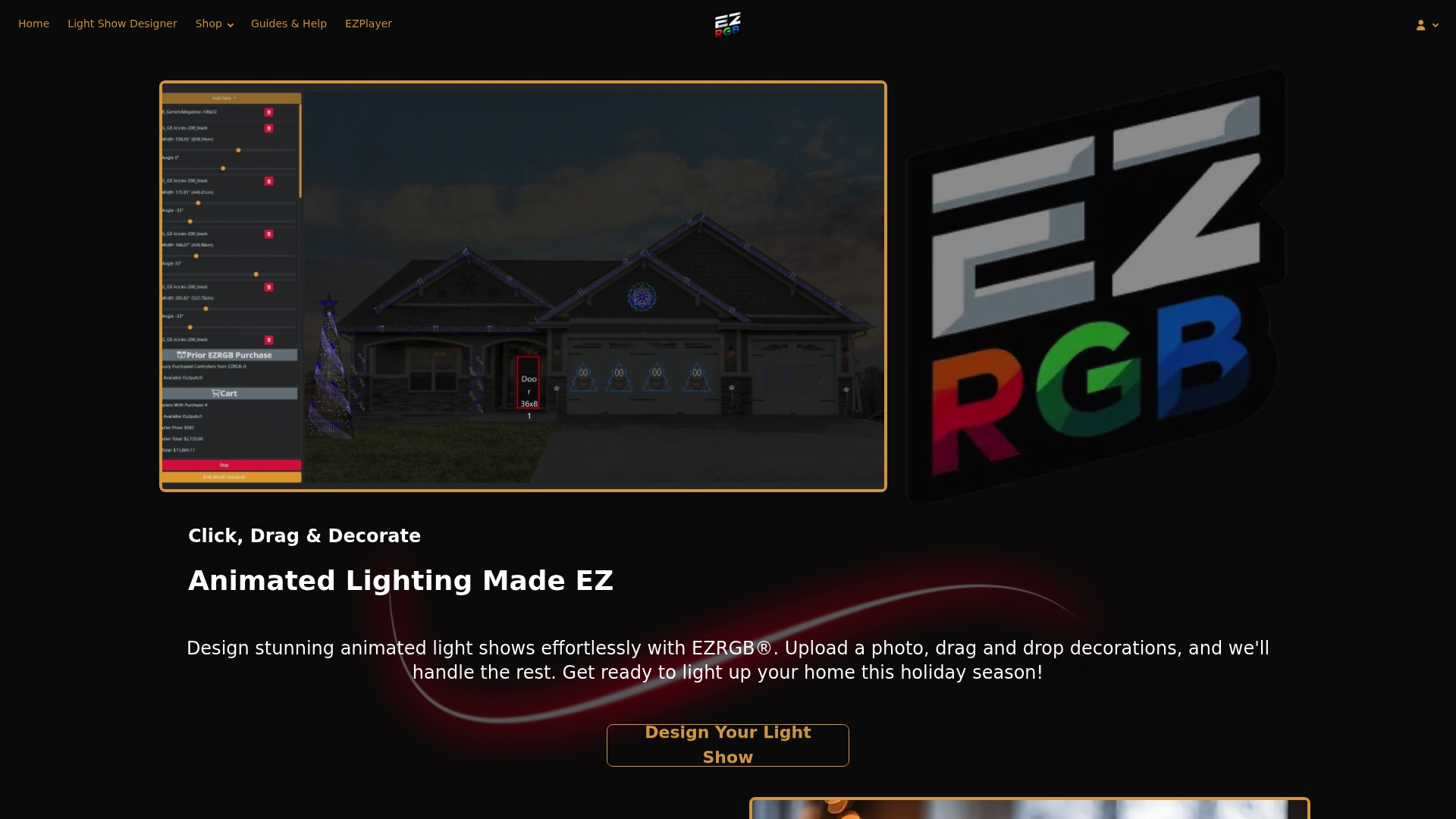
Start by visiting EZRGB.com to request your installer account. From there, access the YouTube demo before your first installer conversation — it shows the full commercial workflow in real time.
Useful sources and links for commercial installers
-
EZRGB Guides and Help — Primary onboarding hub with the 2026 designer guide, placement best practices, and product documentation.
-
Holiday Lighting Placement Best Practices for 2026 — Up-to-date placement guidance useful for proposal checklists and client handouts.
-
How EZRGB Makes Designing Your Light Show Easy — Explains the Designer and EZSequence workflow in plain language.
-
— Full walkthrough of the commercial bid workflow; share with clients or use in sales presentations.
-
City of Smyrna, GA — Holiday Lighting RFP — Municipal procurement template showing deliverable expectations for public-sector bids.
FAQ
What does the EZRGB Commercial Designer do for installers?
The Commercial Designer lets you upload a site photo, place animated RGB props in a drag-and-drop layout, and auto-generate a short music-synchronized sequence — producing a visual proposal in one session.
How does EZPlayer support commercial clients after installation?
EZPlayer is a cloud-based show player that handles scheduling, song syncing, and remote sequence updates, so you can push changes to a client’s show without a site visit.
How do I request an EZRGB installer account?
Submit your business details through the installer onboarding form at ezrgb.com. The EZRGB team reviews applications and follows up directly to complete the vetting process.
What should a commercial RGB lighting bid include?
A complete bid covers pixel props, controllers, installation labor, programming time, lift or access equipment, permits, maintenance visits, takedown, and a 10–15% contingency on the materials and labor subtotal. Anything on the pixel side is figured out on the designer.
Can EZRGB sequences work with xLights?
Yes. EZRGB sequences are compatible with xLights, which allows installers managing multi-site or hybrid show environments to integrate EZRGB programming into existing xLights-based deployments. Sequence effects are locked and hidden but you can add effects to the sequence.